
640by480.com
I built a photo board to get off Zuck’s Hot Rock for Lizard People. It’s at 640by480.com. What started as a refuge from algorithmic feeds has turned into something I didn’t quite expect: a small protocol bridge between mid-90s hardware and the modern web.
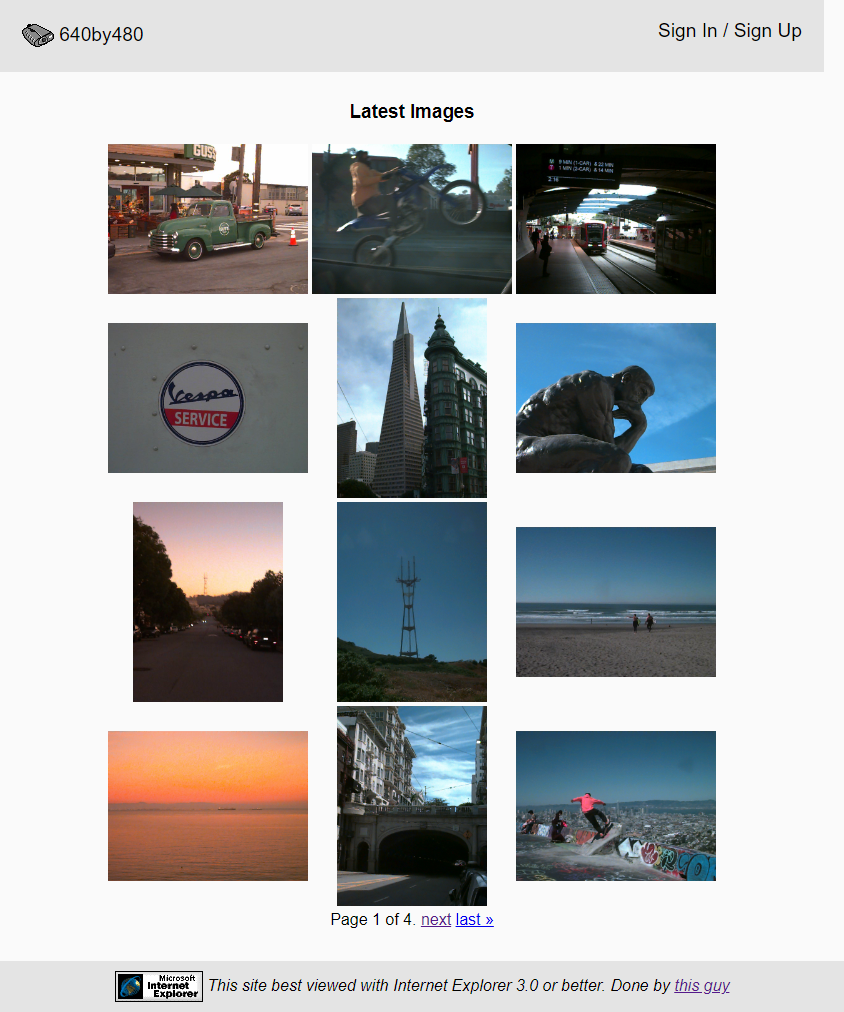
The premise
Posts on the site are capped at 640×480. That’s the native resolution of cameras like the Apple QuickTake 100/150, the Sony Mavica FD-7, the Casio QV-10 — the consumer digital cameras of the mid-90s, the ones that made “digital photography” feel possible before it felt unavoidable.
What it actually is
The stack is Django 3.2, SQLite, Apache + mod_wsgi, a single Linode. Photos auto-resize into three variants (original, 640px detail, 250px thumbnail). Users sign up, post photos with descriptions, comment, follow each other’s profiles. The site has a <table>-based thumbnail grid, default browser fonts, and zero JavaScript on the homepage. It looks like 1999 because it’s for photos that look like 1999. You can navigate the whole thing in Lynx.
What makes it interesting isn’t the social part. It’s the API.
The protocol bridge
640by480.com/api/ is a full REST API with token auth, documented at /api-docs/. CRUD on posts and comments. Filter by camera. List the canonical 23 cameras the system recognizes. Every endpoint is rate-limited (DRF throttles), every authenticated user can read and write.
The reason this matters isn’t because REST APIs are exciting — they’re not — it’s because the API is what makes the site reachable by hardware that the modern web has forgotten. Specifically:
- A Classic Mac OS 7/8/9 client I built for an old PowerBook. It speaks modern TLS via a shim and posts photos to the site over HTTPS. Write-up here.
- An Apple II QuickTake client Colin Leroy-Mira built. Yes, an Apple II, talking to a Django site in 2026.
The Apple II part is the killer. Colin had already written the QuickTake serial protocol code (in 6502 assembly, optimized to within an inch of its life — he wrote about that too). His client needed somewhere to upload photos, and we ended up emailing back and forth about the API while I added the features his client needed.
The server now accepts native Apple QuickTake .qtk raw files directly. The Apple II doesn’t have to decode the proprietary RADC compression locally — it just transfers the bytes, and the server decodes them. A 1995 camera, a 1996 file format, a 1996-era computer, and a 2022 Django site, all in the same upload flow. Each one doing the thing it’s best at.
Writing a pure-Python QuickTake decoder
This project began in 2022, before a small but noticeable resurgence in the use of the Apple QuickTake 100 and QuickTake 150 cameras. These cameras do not write .JPEGs; they were made before JPEG was standardized. In 2022 there were very few software projects to decode QT100 and QT150 images, but during a small update to 640by480 in 2026, significant advances had been made. It was now possible to support uploads of raw QuickTake files.
There are two variants behind two magic bytes at file offset 0:
qktk— QuickTake 100 (1994). Gradient-step predictive coding.qktn— QuickTake 150 (1995). RADC Huffman coding with a piecewise-linear tone curve.
(QuickTake 200, 1997, writes standard JPEGs. Pillow already handles those.)
Both use a Bayer GRBG mosaic, both encode at 640×480 or 320×240, and both have headers that are mostly thumbnail metadata. The actual compressed bit stream starts at an offset that libgphoto2’s source says is 0x2E0, which is true for some files and wrong for others — the real rule is “12 bytes after the second qktk/qktn marker in the header region.” I rfind‘d for it and moved on. The other little gotcha: the header field libgphoto2 calls WH_OFFSET doesn’t store (width, height). It stores (short axis, long axis). Landscape images look fine; portrait images come back transposed if you don’t notice.
I verified the decoder by running it against rawpy.raw_image (LibRaw’s pre-demosaic Bayer mosaic) across the corpus. Per-pixel mosaic correlation 0.70–0.97. The mosaic was correct. Then I started on color.
The color science is the hard part
A Bayer mosaic of a single color channel per pixel, bilinearly demosaiced, is not a photograph. It’s a grayscale-looking thing with hints of color. The whole reason LibRaw exists is the rest of the pipeline: white balance, the camera→sRGB color matrix, the gamma curve, the auto-bright stretch. dcraw embeds Dave Coffin’s measured Apple QuickTake cam→XYZ matrix — nine numbers in 1/10000ths — and that, plus the standard sRGB primaries, is what reproduces LibRaw’s output.
I knew that. I didn’t do it first. I tried, instead, every dumber thing:
- Full row-normalized matrix without WB: heavy green cast.
- Matrix plus a daylight WB I computed from the matrix itself: heavy pink cast.
- HSV saturation amplification (
PIL.ImageEnhance.Colorat 4×): visually OK, no color casts, completely wrong colorimetrically.
The recipe was straightforward. Take Coffin’s matrix, multiply by the sRGB→XYZ primaries to get camera-RGB-from-sRGB, row-normalize, take the pseudoinverse to get the matrix you apply to demosaiced pixels. The inverse of each row’s sum is the daylight WB multiplier the matrix bakes in. After that: WB, demosaic, matrix, BT.709 gamma, a 1% auto-bright stretch. That is exactly what dcraw’s convert_to_rgb + gamma_curve do in C. My first pass landed at 0.907 mean Pearson correlation against rawpy across 26 random files.
0.907 is decent but visibly off. My outputs were systematically brighter than LibRaw’s, especially midtones. I instrumented every step. Mosaic looked fine. Matrix looked fine. Auto-bright was scaling things down, which made no sense if my values were already too bright.
The bug was in the qtkn decoder. RADC outputs feed through a piecewise-linear tone curve that produces 14-bit values in [0, 16383]. dcraw stores those 14-bit values. I had written:
v = curve[tmp[i] & 0xFFFF] >> 4
out[i] = 0 if v < 0 else 255 if v > 255 else v
>> 4 brings 16-bit down to 12-bit, and then I clipped to 8-bit. Half of every QuickTake 150’s tonal range was getting thrown away — every midtone above about 25% of scene-white was getting pinned at 255. Auto-bright dutifully scaled things to compensate, and the whole image came out hot.
The fix was: don’t.
out[i] = 0 if v < 0 else 16383 if v > 16383 else v
Return uint16. Let the color pipeline normalize by the actual sensor white level. Correlation jumped from 0.907 to 0.966 mean / 0.976 median in one diff. The green channel, which the curve touches the hardest, went from 0.943 to 0.996 mean. The qtkt path was already 8-bit-native by design (Coffin clips the predictor that way in dcraw, too) and didn’t need this fix.
The decoder is one file: posts/image_formats/_pure_decoder.py, about 550 lines. The Pillow plugin shim that registers .qtk as a first-class image type is another 60. If somebody wanted to package the whole thing as pillow-quicktake on PyPI, almost everything they’d need is sitting in that file.
What 640by480 is NOT
It’s not trying to be Instagram. Well, it is, just in a, “if Len, of Steal My Sunshine fame, announced their new album You Can’t Stop The Bum Rush on Instagram kind of way”. The grid is anonymous on purpose, you don’t see who took which photo until you click through to the post page. There’s no algorithm. There’s no “like” button. There’s no view counter. In 1999, those ideas had yet to be invented by the people who would make the world terrible. There’s a feed and there are individual photos. That’s it.
It’s also not trying to scale. SQLite. One server. No CDN. If it ever gets popular enough to break, that’s a me problem and I’ll deal with it. The point of the site is to exist quietly and persistently for the small group of people who care about this exact niche.
What’s there now
A non-exhaustive list of what currently works:
- Upload formats: JPEG, PNG, GIF, HEIC (iPhone), MPO (Pixel HDR+), and native Apple QuickTake
.qtkraw - Image preview + rotate-before-posting in the upload form
- Cameras as a first-class entity —
/cameras/browses by camera with a live JS filter, each post detail shows the camera attribution in the byline, the upload form auto-fills the camera when you drop in a.qtkfile (it sniffs the magic bytes —qkttfor QuickTake 100,qktnfor 150) - Comment system, user profiles, edit + delete your own posts (with media-file cleanup)
- Full REST API, self-hosted docs at
/api-docs/ - Levenshtein-based camera typeahead on the upload form so you don’t accidentally create a fourth spelling of “Sony Mavica FD-91”
- Rate-limited everywhere relevant (6 uploads/min/user, 5 login attempts/min/IP)
- Decompression-bomb protection (50 MP cap on raw decode)
I miss the Internet
The internet used to have lots of small sites, built by individual people, with strange constraints and obvious authorship and no growth targets. Then it had a long Instagram-shaped phase where everything looked the same. Now there’s a quiet resurgence of constraint-driven small sites. neocities, the indieweb, glass.photo, marginalia search, the Gemini protocol scene. 640by480 belongs in there. Not because the world needs another social photo site, but because someone with a working QuickTake 150 needs somewhere to put those photos that isn’t owned by a company that thinks of him as inventory.
If you have an old digital camera and want to participate, the site is at 640by480.com. The API docs are at /api-docs/. If you want to build a client for some other vintage machine, email me — I’ll list it on the /clients/ page.